
How I went from tool-hopping chaos to actually shipping code with AI
Every week in 2025, a new AI coding tool was launched. Every week, Twitter exploded with “This changes everything!” posts. Every week, I installed something new, convinced this would be the one.
It wasn’t.
I spent months jumping between tools, watching tutorials, tweaking configs, and—crucially—not actually shipping code. The promise of “10x developer productivity” felt like a cruel joke when I spent more time fighting with my tools than building.
This is the story of how I broke that cycle.
My journey through AI coding tools reads like a graveyard of abandoned configs:
VS Code + Copilot (early 2025) The gateway drug. Autocomplete on steroids. Nice, but felt like training wheels. I wanted more.
Cursor (spring 2025) The hype was insane. “VS Code but with AI built in!” I went all in. Custom prompts, composer mode, the works. It was good—until it wasn’t. Context limits hit hard. A composer would confidently generate code that broke everything. I’d spend hours debugging AI-generated bugs.
Antigravity (summer 2025) Someone on Twitter said it was better than Cursor. It wasn’t. Back to Cursor.
Cursor + Claude (summer 2025) Now we’re using Claude as the brain! This should fix everything!
It didn’t.
The problem wasn’t the model. The problem was me.
August 2025. If you were using Claude Code during this time, you remember. Everyone was suffering:
“Hit 5hr limit in 7 messages (Pro)… useless.” “API Error: 500 ‘Overloaded’ all night.” “Plan mode: Decline → still writes files; AUP loop.”
Rate limits felt tighter than ever. Shared limits between Claude chat and Claude Code meant you’d burn through your allocation just asking questions. The status page showed green while everything was on fire.
I have a Performance Report from that week. The mood was “mostly negative”—words like “fraud” and “scam” appeared. Refunds were requested. People fled to Gemini and GPT.
I almost quit, too.
But I didn’t quit. Instead, I stopped and asked myself: What am I actually trying to accomplish here?
The answer wasn’t “use the coolest AI tool.” It was “ship code faster.”
So I stripped everything back. I stopped chasing features. I stopped watching “Ultimate Cursor Setup” videos. I started paying attention to what actually worked.
And something clicked.
The people shipping real code weren’t using the fanciest setups. They were using boring, reliable workflows. They had clear mental models. They treated AI as a collaborator, not a magic wand.
I found Boris Cherny’s thread about using Claude Code. He created the tool, yet his setup is “surprisingly vanilla.” The key insights:
Simple. Boring. Effective.
My current setup is embarrassingly minimal:
Terminals: Ghost (after iTerm 2 → Warp → Ghost) Editor: Cursor (without Pro subscription—don’t need it) AI: Claude Code CLI directly in terminal, 50% of the time Split: 50% terminal, 50% Cursor with Claude Code as terminal
That’s it.
I code on both Mac and PC to stay sharp on both platforms. The biggest insight? Setup is 10x faster with AI. Not the coding itself—the setup. Build processes, testing pipelines, documentation, CI/CD configs. That’s where AI shines brightest.
The actual coding? AI helps, but it’s maybe 2-3x, not 10x. And that’s fine.
After a year of chaos, here’s what actually stuck:
Every hour spent tweaking your AI setup is an hour not spent shipping. Good enough is good enough.
Claude Code’s plan mode exists for a reason. Use it. Go back and forth until the plan makes sense. Then execute.
Don’t dump your entire codebase into context. Be surgical. One file, one problem, one solution.
Tests. Docs. Configs. Migrations. Boilerplate. Let AI handle the tedious work so you can focus on the hard problems.
“Trust but verify” is the only way. AI will confidently generate garbage. You need to catch it. Write tests. Review diffs. Actually read the code.
When Claude does something stupid, add it to CLAUDE.md. Your future self will thank you for the institutional memory.
Here’s something the “no-code AI” crowd won’t tell you: tools like Lovable and Bolt create impressive prototypes, not production systems.
I’ve rebuilt multiple platforms that started as AI-generated prototypes. They looked great in demos. They fell apart at scale. No proper architecture. No consideration for edge cases. Technical debt from day one.
The real winners of AI coding are senior developers. Not because we write better prompts—because we understand what good code looks like. We know how to scale. We know where the bodies are buried.
When I use Claude Code, I never let the code just fly by. I always have the code window open beside me. I review every change as if I’m pair-programming with a junior dev or reviewing a PR from a colleague. Line by line. Understanding every decision.
This isn’t paranoia—it’s professionalism.
And here’s the perspective that took me years to develop: 80%+ of your code will be rewritten anyway. In any serious project or company, today’s beautiful architecture becomes tomorrow’s legacy refactor.
So why put so much prestige on writing the “perfect” code yourself?
The goal isn’t perfect code. The goal is shipping the right solution, with the right architecture, using the right tools. Sometimes that means writing it yourself. Sometimes that means letting AI draft it while you guide the structure.
Senior devs get this. Juniors are still attached to “their” code.
AI coding tools won’t make you 10x more productive overnight. Anyone who tells you otherwise is selling something.
But they will make you faster at the parts of coding that nobody enjoys. Setup. Documentation. Repetitive refactors. Test coverage. The grunt work.
That’s nothing. That’s actually huge.
The real unlock isn’t the tool—it’s understanding what the tool is good at and ruthlessly applying it there while staying out of its way everywhere else.
I wasted months learning this the hard way. Hopefully, this saves you some time.
If you want to see exactly how I configure Claude Code and Cursor, I’ll share my dotfiles and settings. Drop a comment or DM me.
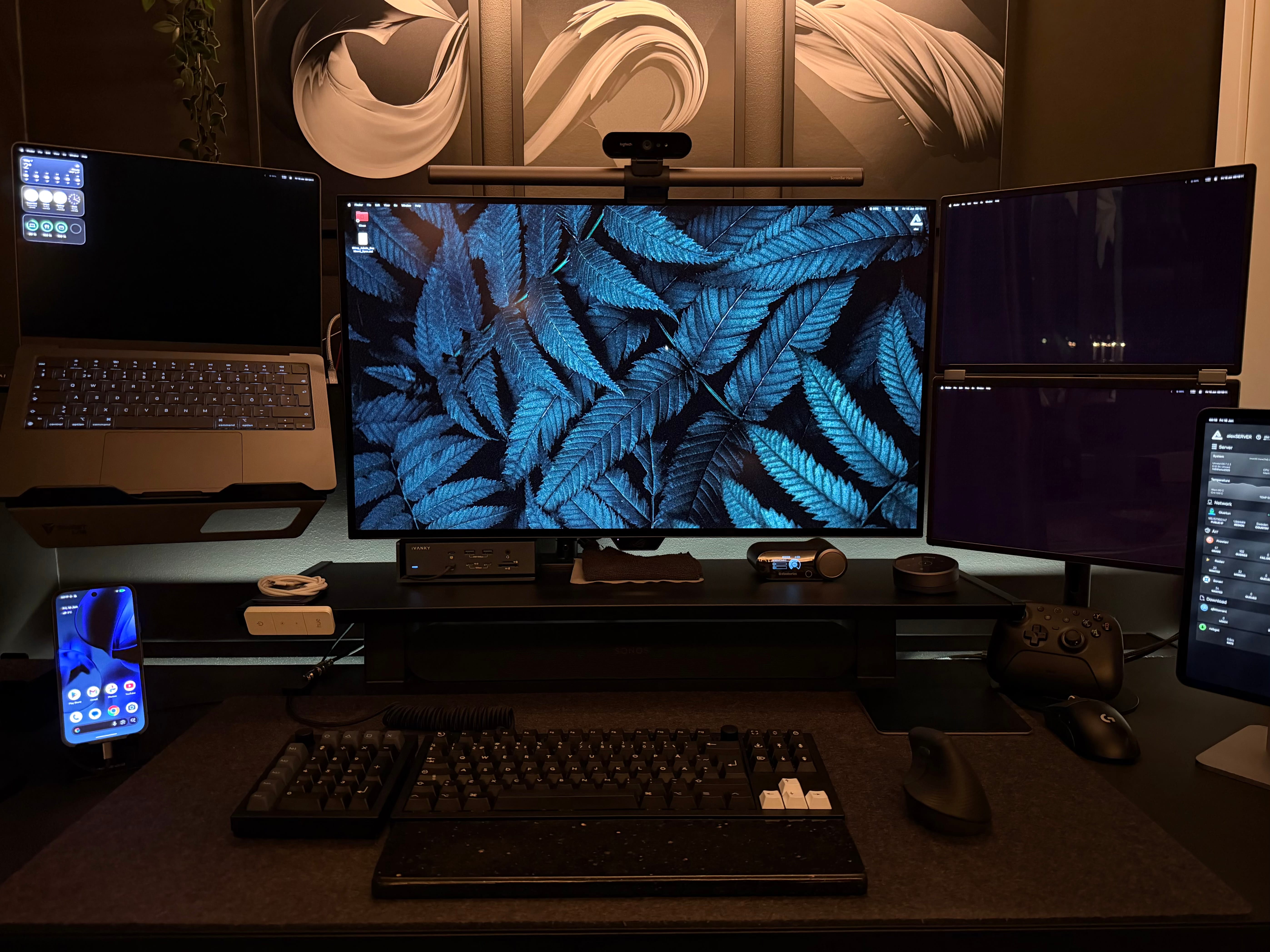
Screens:
ASUS 32″ ROG Swift PG32UCDP OLED 4K 240/480 | ASUS ZenScreen Duo OLED MQ149CD
Workstation:
MacBook Pro 14″ Apple M4 Max | 64 GB | 1TB
LLM/Game rig:
AMD Ryzen 9 9950X3D | ASUS ROG STRIX GeForce RTX 4090 | ASUS ROG Strix X870-F GAMING WIFI | Kingston 128GB (2x64GB) DDR5 6000MHz CL30 FURY Beast | Samsung 990 Pro 2TB M.2 | Samsung 970 EVO Plus 2TB M.2 | NZXT Kraken Elite V2 360mm | NZXT H5 Flow 2024 | NZXT C1200 1200W